
When Meta disables your Facebook ad account, your first move is a review request in Meta Business Support Home. Meta says a review typically finishes within 48 hours. You get a limited number of them, though, and the decision after one is final. Most disables trace back to a policy flag, a payment problem or activity that looked unusual.
That's the short answer, checked against Meta's own help pages on 18 November 2026. Below are the exact review steps, the six-month rule that decides whether a Facebook ad account disabled for policy comes back at all, and why fixing the account alone often isn't enough. At Icarus we've run Meta ads for restricted brands since 2016, and the account is rarely the whole problem. What we see is that Meta judges the profile, the ad account and the Business Manager behind every ad. If you'd rather hand the rebuild to people who do this every day, our paid ads service for restricted brands is where that starts.
On this page
What does it mean when a Facebook ad account is disabled?
A disabled ad account can't run ads, and anything that was live has stopped. For most brands that means sales have stopped too. Owners often call it banned. Meta says disabled, or "restricted from advertising", and that can apply to more than the ad account:
- your business portfolio (the Business Manager)
- the ad account
- the Facebook Page you advertise from
- your own user profile
That list comes from Meta's page on requesting a review for a restricted advertising account. It matters because the restriction you see on the ad account may have started somewhere else on that list.
To see what was hit and when, open Meta Business Support Home on a computer, select Account status overview and pick the account. The What you can do section tells you which steps Meta wants from you.
What to do first: request a review the right way
Meta gives one route back, and it runs through Business Support Home. These are the steps from Meta's troubleshooting page for disabled or restricted accounts:
- On a computer, go to Business Support Home and select Account status overview.
- Click the restricted account.
- In What you can do, take the step Meta shows you. That may be Confirm your identity, Start verification, Secure your account or Request review.
- Complete the on-screen steps.
Know these before you click anything:
- You must be an admin on the account to request a review.
- Reviews are limited. Meta says there's a limited number of times you can request one, and once a review is done the decision is final. Sort identity, 2FA and billing before you ask. Meta also says requesting a review won't hurt your standing.
- 48 hours is typical. Meta says its review usually finishes in that time and sometimes takes longer.
- Identity checks come first in most cases. Meta may ask for the email on the account, your phone for a text, a photo of your passport or driving licence, or the payment method on the account. Some accounts come back the moment this is done.
- Two-factor authentication can be the whole fix. If you're a user of a business portfolio over 90 days old, Meta may restrict access until you turn it on.
- Your ads won't restart on their own. After reinstatement you switch them back on in Ads Manager.
One more thing to hold off on: opening a fresh account the same afternoon. In our experience, Meta links accounts through the profiles and Business Managers they share. A new account built on the same weak link tends to be restricted again, and then you've lost two.
Why was my Facebook ad account disabled?
Most disables come from one of three places:
- Ad policy. Restricted products, claims Meta reads as misleading, or a landing page that breaks its rules.
- Payment. Declined cards, failed charges and billing errors.
- Unusual activity. A sudden jump in budget, logins from new places, or shared access with a profile Meta has already flagged.
For restricted brands there's a fourth, and it's the one owners miss. Rejections pile up. Meta watches how many of an account's ads get approved and how many get rejected. When the rejected side grows too quickly, the account itself gets flagged, even if no single ad looked like a big deal.
What drives those rejections changes all the time. The same ad can pass on one ad account and fail on another. A brand-new account with little approved history gets rejected more easily than one with a long record. Meta also updates what its review catches, so a word or image that ran fine last month can start failing this month. Our media buyers read each rejection for the variable that caused it: the copy, the image, a product keyword, the Page, even the comments under the ad. Our guide to why CBD ads keep getting rejected goes deeper on one category.
Some products can't be advertised on Meta in plain terms at all. Meta's tobacco and related products policy bans ads for vapes, including nicotine-free and wellness vapes. Run those as plain product ads and the rejections stack up quickly, and no review fixes a restriction that comes from the product itself. For these brands, how the ads are built and run matters more than the appeal. Our breakdown of Meta's advertising policies for high-risk brands covers where each category stands.
Why your ad account is only one link in the chain
In our experience, Meta doesn't judge your ad account on its own. It ties every asset into one chain, and trust flows along it. A weak profile can drag down the ad account it runs. A damaged ad account can drag down the Business Manager it was created in. Meta scores each link with a trust rating you never see. There's no meter for it in Ads Manager.
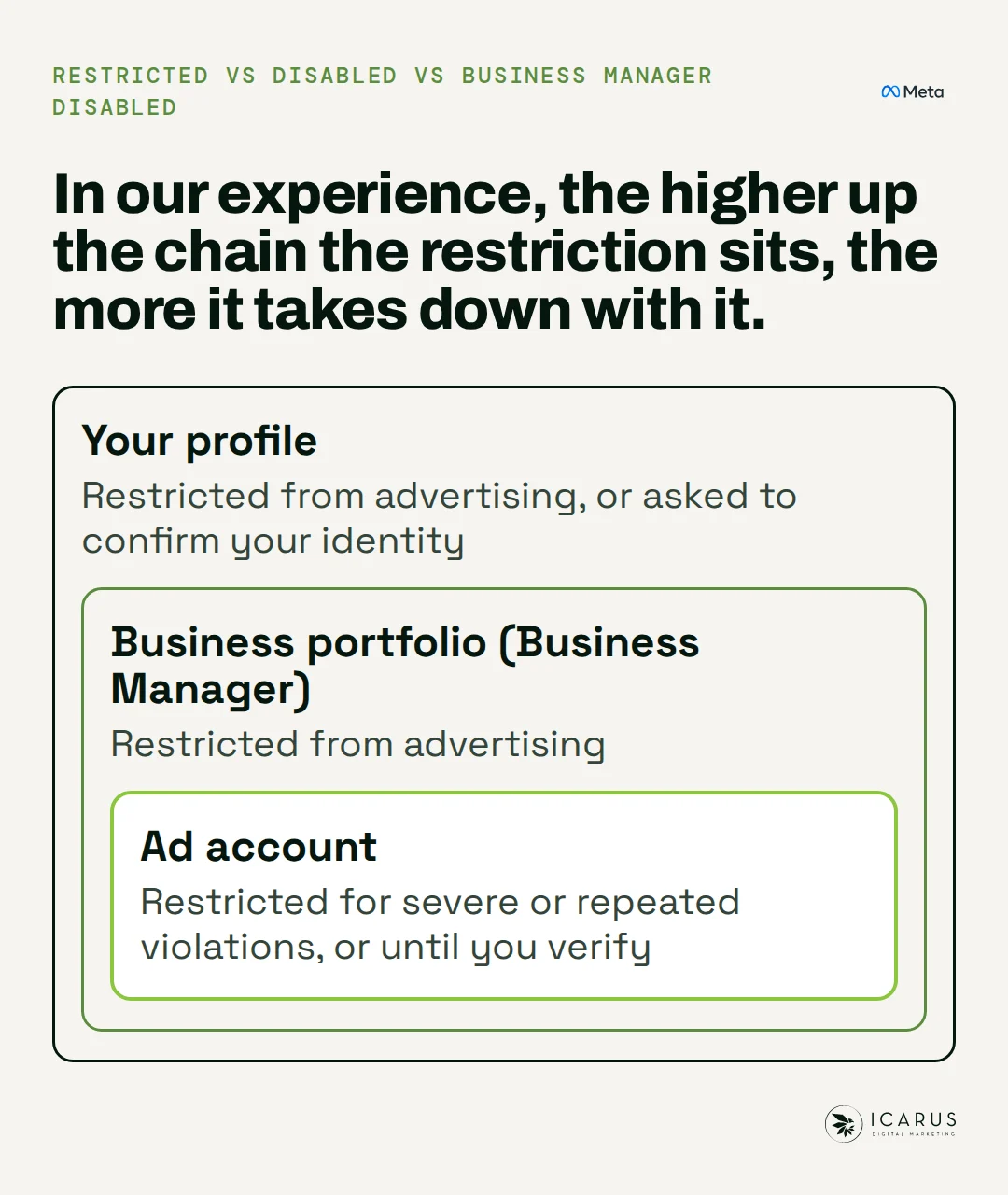
So an appeal can win the account back while the weak link stays where it was. Here's how each link fails, and what a review does about it:
| Link in the chain | What Meta is judging | How it takes the account down | Does the review fix it? |
|---|---|---|---|
| Your profile | The person behind the ads: their logins and who else they're linked to | A flagged profile drags every account it touches | Not the ad account's review. Follow the steps Meta shows for the profile, including identity checks or a review when available |
| The ad account | Its own history: approvals, rejections, spend pattern | Too many rejections, or a spend jump on a thin history | This is the link the review looks at |
| The Business Manager | Every account and Page inside it | One damaged account can taint the portfolio and every new account made from it | Partly. A restricted portfolio has its own review |
| The payment card | Charges and billing | Declines and "suspicious activity" holds that have nothing to do with your ads | No. You fix the billing yourself |
The card is the link people forget. A card can trip a suspension through a billing glitch alone, with nothing wrong in the ads.
Is a disabled Facebook ad account permanent?
It can be. Meta's rule is plain: if your ad account is disabled for a policy violation and stays ineligible for reinstatement for six months, it can't be reinstated after that. Any unused prepaid funds may be forfeited where the law allows. Meta also keeps the right to disable an account permanently before the six months are up. That's in the same troubleshooting page.
Put that next to the limit on reviews and the order of work is clear. First find out which link failed: in Account status overview, check which of the four is flagged (portfolio, ad account, Page or profile). If it's the profile or the portfolio, the ad account is only where the problem showed up. Fix what you can, like 2FA, identity and billing. Then make one careful request.
Should you open a new Facebook ad account?
Open a new account only once you know which link failed, and only on a link that's clean. Here's how the choice usually plays out:
- The account was hit for a billing or security reason and you've fixed it: request the review and wait. The account's history is worth keeping.
- The account was hit for policy and the review failed: that decision is final. A new account is the route, but not from the same profile or Business Manager if either is under a cloud.
- The restriction sits on the profile or the portfolio: a new ad account inside it won't help. The chain needs rebuilding.
Your pixel is the part you don't want to lose. The pixel holds what Meta has learned about your buyers, and attaching the same pixel to a new account keeps that data. A new account does need time to build an approval record. Launching it straight into your boldest creative is how a second account goes the way of the first.
How we keep restricted brands' ads running
This is the work our Meta and Snapchat ads service does. Your campaigns don't run on your own ad account. We run them through official Meta partners, on their ad accounts. You supply the pixel and the ad spend.
Our media team, led by one of our co-owners, runs those accounts and makes the calls. Every rejection gets read for its cause. Our agents do the heavy lifting on research and creative, so fresh ads are ready when the account needs them. And you see all of it in your Icarus dashboard: the spend, every ad, what's running and what's waiting for your yes.
Keeping ads live is the basic part of the job. The real work is the buyers, the offer and the creative, which our guide to scaling high-risk campaigns picks up.
Request the review today. If Account status overview flags your profile or business portfolio, follow the steps Meta gives for that asset, including requesting a review when that option is available. Running ads on a chain that holds is our work: talk to our paid ads team.